
Launching setup.exe on the starcraft CD immediatly causes a BSOD.
Part of what it says on the BSOD is says: "The Problem Seems to be caused by the following file: win32k.sys KMODE_EXCEPTION_NOT_HANDLED"
Attached is a screenshot of the BSOD.
I would have put this on bugzilla if bugzilla hadn't given me the error: " The 'bug number' // is invalid. If you are trying to use QuickSearch, you need to enable JavaScript in your browser. To help us fix this limitation, add your comments to bug 70907 http://bugzilla.mozilla.org/show_bug.cgi?id=70907."
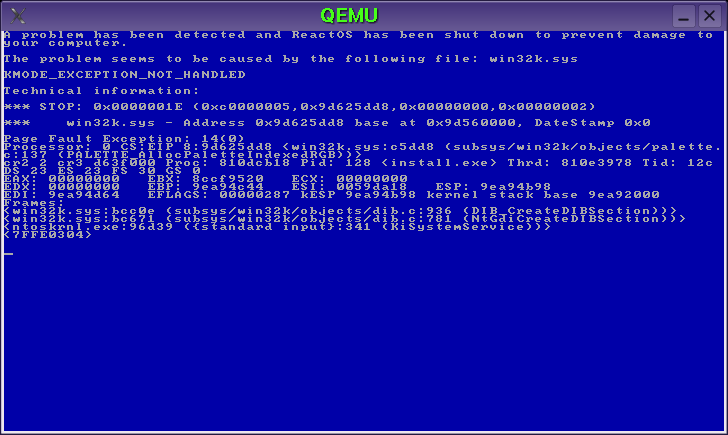

I believe this is an error related to our video driver support, as with the stock VGA driver things have always worked fine...for me anyway. When using the VESA or VMWare drivers things mess up.
Reuben Perelman wrote:
Launching setup.exe on the starcraft CD immediatly causes a BSOD.
Part of what it says on the BSOD is says: "The Problem Seems to be caused by the following file: win32k.sys KMODE_EXCEPTION_NOT_HANDLED"
Attached is a screenshot of the BSOD.
I would have put this on bugzilla if bugzilla hadn't given me the error: " The 'bug number' // is invalid. If you are trying to use QuickSearch, you need to enable JavaScript in your browser. To help us fix this limitation, add your comments to bug 70907 http://bugzilla.mozilla.org/show_bug.cgi?id=70907."
Ros-dev mailing list Ros-dev@reactos.com http://reactos.com:8080/mailman/listinfo/ros-dev
How do I change to video driver?
Richard Campbell wrote:
I believe this is an error related to our video driver support, as with the stock VGA driver things have always worked fine...for me anyway. When using the VESA or VMWare drivers things mess up.
Reuben Perelman wrote:
Launching setup.exe on the starcraft CD immediatly causes a BSOD.
Part of what it says on the BSOD is says: "The Problem Seems to be caused by the following file: win32k.sys KMODE_EXCEPTION_NOT_HANDLED"
Attached is a screenshot of the BSOD.
I would have put this on bugzilla if bugzilla hadn't given me the error: " The 'bug number' // is invalid. If you are trying to use QuickSearch, you need to enable JavaScript in your browser. To help us fix this limitation, add your comments to bug 70907 http://bugzilla.mozilla.org/show_bug.cgi?id=70907."
Ros-dev mailing list Ros-dev@reactos.com http://reactos.com:8080/mailman/listinfo/ros-dev
Ros-dev mailing list Ros-dev@reactos.com http://reactos.com:8080/mailman/listinfo/ros-dev

From: Reuben Perelman
Launching setup.exe on the starcraft CD immediatly causes a BSOD.
Does the patch below fix this?
Gé van Geldorp.
Index: objects/dib.c =================================================================== --- objects/dib.c (revision 17937) +++ objects/dib.c (working copy) @@ -847,7 +847,13 @@ }
if(usage == DIB_PAL_COLORS) + { lpRGB = DIB_MapPaletteColors(dc, bmi); + if (NULL == lpRGB) + { + lpRGB = bmi->bmiColors; + } + } else lpRGB = bmi->bmiColors;
Ge van Geldorp wrote:
From: Reuben Perelman
Launching setup.exe on the starcraft CD immediatly causes a BSOD.
Does the patch below fix this?
Yes it does.
Gé van Geldorp.
Index: objects/dib.c
--- objects/dib.c (revision 17937) +++ objects/dib.c (working copy) @@ -847,7 +847,13 @@ }
if(usage == DIB_PAL_COLORS)
- { lpRGB = DIB_MapPaletteColors(dc, bmi);
- if (NULL == lpRGB)
- {
lpRGB = bmi->bmiColors;- }
- } else lpRGB = bmi->bmiColors;
Ros-dev mailing list Ros-dev@reactos.com http://reactos.com:8080/mailman/listinfo/ros-dev
Glad I could help you, and help get my favorite game working on ReactOS.
BTW, the colors on the liltle setup title program (or whatever you call it) where weird. Just skin deep, and starcraft finished installation as usual. However, it fails the CD test as it usually does.
Ge van Geldorp wrote:
From: Reuben Perelman
Ge van Geldorp wrote: Does the patch below fix this?
Yes it does.
Ok, thanks for testing. The patch is an ugly hack and I don't want to commit it. But at least I know what's going on now and can think about a better patch.
Ge van Geldorp.
Ros-dev mailing list Ros-dev@reactos.com http://reactos.com:8080/mailman/listinfo/ros-dev
If nobody has tested it by this evening i will.
Ge van Geldorp wrote:
From: Reuben Perelman
Launching setup.exe on the starcraft CD immediatly causes a BSOD.
Does the patch below fix this?
Gé van Geldorp.
Index: objects/dib.c
--- objects/dib.c (revision 17937) +++ objects/dib.c (working copy) @@ -847,7 +847,13 @@ }
if(usage == DIB_PAL_COLORS)
- { lpRGB = DIB_MapPaletteColors(dc, bmi);
- if (NULL == lpRGB)
- {
lpRGB = bmi->bmiColors;- }
- } else lpRGB = bmi->bmiColors;
Ros-dev mailing list Ros-dev@reactos.com http://reactos.com:8080/mailman/listinfo/ros-dev
-
 Ge van Geldorp
 -
 Reuben Perelman
 -
 Richard Campbell