
With the Mozilla ActiveX Control , I can browse "www.reactos.com" from the Reactos Explorer as indicated before. The link to www.reactos.com is made by explorer at start but I do not know how to type an URL (www.google.com for example) in the Explorer window ?
Any idea ?
Regards Gerard

Hi Gerard,
With the Mozilla ActiveX Control , I can browse "www.reactos.com" from the Reactos Explorer as indicated before. The link to www.reactos.com is made by explorer at start but I do not know how to type an URL (www.google.com for example) in the Explorer window ?
Any idea ?
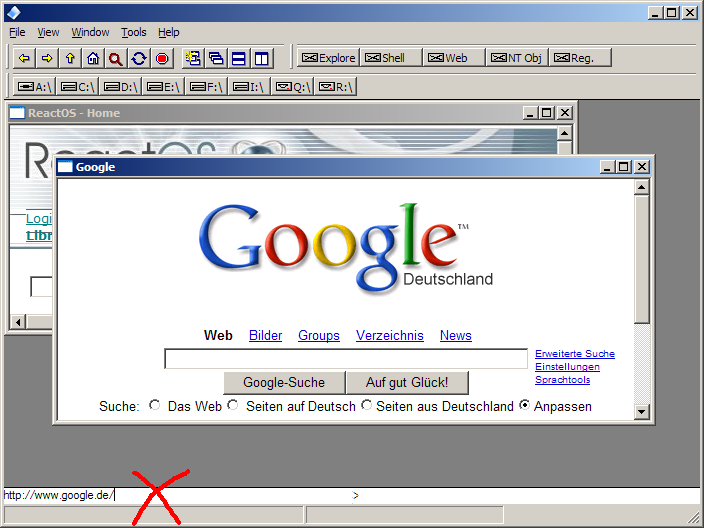
Sure, type it into the address bar located at the left at the window bottom. (see the attached screen shot) Does this already work in ROS? I am running it on XP. Regards,
Martin

Hi,
--- Martin Fuchs martin-fuchs@gmx.net wrote:
Sure, type it into the address bar located at the left at the window bottom. (see the attached screen shot) Does this already work in ROS? I am running it on XP. Regards,
The last time I tested the Mozilla control under ReactOS it would only connect to one website. Any URLs you tried to manually input of follow resulted in nothing.
Thanks Steven
P.S. Martin would it be to much trouble to make a stand alone shortcut on the desktop that loads the Mozilla control in a SDI Window? I tried to embedded the COM object in a standalone application but my C++ skill sucks. I would like to have a shortcut on the ReactOS desktop called "Internet Browser" that when you click on it, it loads a SDI explorer window thats a embedded control.
__________________________________ Do you Yahoo!? Meet the all-new My Yahoo! - Try it today! http://my.yahoo.com
Hello,
P.S. Martin would it be to much trouble to make a stand alone shortcut on the desktop that loads the Mozilla control in a SDI Window? I tried to embedded the COM object in a standalone application but my C++ skill sucks. I would like to have a shortcut on the ReactOS desktop called "Internet Browser" that when you click on it, it loads a SDI explorer window thats a embedded control.
OK, I will put it on my TODO list Do you think we should call the program "iexplore.exe" ? It is really comparable to IExplorer, that's also more or less just a wrapper for the MS Web browser control. And we can use both: the Mozilla control and the MS control.
Regards,
Martin
Hi Martin,
--- Martin Fuchs martin-fuchs@gmx.net wrote:
OK, I will put it on my TODO list Do you think we should call the program "iexplore.exe" ? It is really comparable to IExplorer, that's also more or less just a wrapper for the MS Web browser control. And we can use both: the Mozilla control and the MS control.
We have a replacement for regedit called regedit.exe so I don't see why we can't call it iexplorer.exe but I would think to avoid leagal problems we should call it "Internet Browser". I am working on getting Internet Explorer to install under ReactOS so maybe we should name it ibrowser.exe so it does not get replaced if you install IE.
Thanks Steven
__________________________________ Do you Yahoo!? The all-new My Yahoo! - What will yours do? http://my.yahoo.com

Steven Edwards wrote:
We have a replacement for regedit called regedit.exe so I don't see why we can't call it iexplorer.exe but I would think to avoid leagal problems we should call it "Internet Browser". I am working on getting Internet Explorer to install under ReactOS so maybe we should name it ibrowser.exe so it does not get replaced if you install IE.
We may have to install it as both iexplore.exe as well as ibrowser.exe, because certain ill-behaved apps may look for iexplore.exe, and we want it to find the user's browser, regardless of whether they've installed MS's IE or are using ours.
--- Royce Mitchell III royce3@ev1.net wrote:
We may have to install it as both iexplore.exe as well as ibrowser.exe, because certain ill-behaved apps may look for iexplore.exe, and we want it to find the user's browser, regardless of whether they've installed MS's IE or are using ours.
Your right. There are a few other things I was wanting to do with it but got stuck on embeddeding the stupid control in a SDI window. I mostly stripped it out of explorer and have a working demo that uses MDI but it needs to be stripped even more.
Thanks Steven
__________________________________ Do you Yahoo!? Yahoo! Mail - 250MB free storage. Do more. Manage less. http://info.mail.yahoo.com/mail_250
On 25.01.2005 00:36:53 Steven Edwards wrote:
--- Royce Mitchell III royce3@ev1.net wrote:
We may have to install it as both iexplore.exe as well as ibrowser.exe, because certain ill-behaved apps may look for iexplore.exe, and we want it to find the user's browser, regardless of whether they've installed MS's IE or are using ours.
Your right. There are a few other things I was wanting to do with it but got stuck on embeddeding the stupid control in a SDI window. I mostly stripped it out of explorer and have a working demo that uses MDI but it needs to be stripped even more.
Well, it's not so difficult to instantiate the control in a simple window. But you have to integrate it with a toolbar, status bar, address bar, and you presumably want to be able to use bookmarks. By the way: many people swear on Opera or other browser like Avant because they provide a MDI user interface. But I think for ROS a browser with an interface similar to MSIE is enough. I'm also using the Explorer source code to create this browser GUI. My version currently even does not yet compile without problems. ;-) But I think it will not take too long until you can see something running.
Regards,
Martin

-----BEGIN PGP SIGNED MESSAGE----- Hash: SHA1
Royce Mitchell III wrote: | We may have to install it as both iexplore.exe as well as ibrowser.exe, | because certain ill-behaved apps may look for iexplore.exe, and we want | it to find the user's browser, regardless of whether they've installed | MS's IE or are using ours.
Can you make shortcuts on ROS yet? If so, can you just make a shortcut to ibrowser.exe, or somehow interpret a request to "iexplore.exe" as one to ibrowser.exe unless someone's installed IE on the system?
~ -uniQ
Steven Edwards wrote:
We have a replacement for regedit called regedit.exe so I don't see why we can't call it iexplorer.exe but I would think to avoid leagal problems we should call it "Internet Browser". I am working on getting Internet Explorer to install under ReactOS so maybe we should name it ibrowser.exe so it does not get replaced if you install IE.
Wait a sec... why do we care if it gets replaced by IE. If the user has elected to install IE, then why do we care to make sure a copy of ours hangs around?
Hi,
--- Royce Mitchell III royce3@ev1.net wrote:
Wait a sec... why do we care if it gets replaced by IE. If the user has elected to install IE, then why do we care to make sure a copy of ours hangs around?
Several applications such as Quicken, Quickbooks, Microsoft Office, etc install IE by default. Its not just a matter of the user opting to install IE.
Thanks Steven
__________________________________ Do you Yahoo!? Yahoo! Mail - 250MB free storage. Do more. Manage less. http://info.mail.yahoo.com/mail_250
-
 Gge
Gge -
 K McI
K McI -
 Martin Fuchs
 -
 Royce Mitchell III
 -
 Steven Edwards