
Hi All,
I wanted to start fresh since there are several emails/chats going around regarding Visual Studio builds of ReactOS.
First, I would like to state something clearly, since there seems to be implicit thoughts to the contrary:
Visual Studio is capable of handling a project the size of ReactOS in its entirety in one .sln without any major performance problems, if it is configured correctly.
The key phrase is "if it is configured correctly".
For example:
1. The performance problem during loading occurs because IntelliSense is being unnecessarily taxed (quite heavily in fact). This is fixed by adding #define WIN32_LEAN_AND_MEAN as appropriate to the IDE settings.
2. The lack of x86_64 and ARM support is occurring because there is a lack of x86_64 and ARM support. :D
3. Some people might look at the Solution Workspace window, see 800 projects, and think, "Wow. That's a lot of projects. I will be scrolling all day long." There is a solution (no pun intended) for that: Don't put 800 projects linearly in the Solution Workspace. Put them in a hierarchy that matches, exactly, the hierarchy of the ReactOS project.
4. That build paths will be broken if the user decides to move his/her ReactOS hierarchy to a different directory after the .sln and .vcxproj files have been generated by cmake, is easily fixed: Use relative paths in the IDE project settings instead.
5. The fact that it is not possible to build, say, just applications, or just drivers, without hunting-and-pecking projects in the Solution Workspace, is related to problem #3: The projects are not yet placed into a hierarchy that mirrors the ReactOS repository. If the projects were placed into a hierarchy that mirrors the ReactOS repository, it would be possible to select, say, drivers, right-click, select Build, and all the drivers will be built depends on what was done in the code, as well as setting proper paths in the IDE. The use would be able to toggle between Debug/Release, x86_32/ARM, and perform the same operation, with expected results.
I could go on, but you get the point. It is trivial to set up Visual Studio so that it "behaves properly". I started this effort, and was 10% into the 800 projects, at least setting up the structure, for x86_32, x86_64, and ARM; but I throttled-back because I do not like redundancy of effort, and Amine was already well on his way doing something that was essentially similar. I am confident that, over time, he will solve these problems.
In the meantime, I would hope that we keep in mind that the problem is not the tool. The problem is that the tool has not been given a chance to be configured properly.
If we configure it properly, these problems go away, and most importantly, when a new developer comes and sees ReactOS in Visual Studio for the first time, what they see makes sense. Let me repeat that: The measure of success here, is not whether it is possible to get Visual Studio to compile ReactOS, although I read some writings about how some wanted the Microsoft compiler over GCC. The measure of success is whether a heavily experience user of Visual Studio sees the IDE for the first time with ReactOS in it, and not start mumbling things like.."Ok.uh... why did they do that.???"
By contrast we want them to say:
"Wow.800-project solution. Let's see, x86_32, x86_64, ARM support..nice.both Debug and Release present.good good.looks like Solution Workspace mirrors what is on disk..cool.#include paths in IDE project settings are relative to root of solution so I can move solution to another disk if I like.appreciate that.IntelliSense seems to be working correctly.and this livecd thing.I guess right-clicking on that and doing Build does minimum operations necessary to generate a live CD. I wonder what happens when I try to execute the livecd project after built. Wow.that is too awesome!!! Ok. Everything makes sense. I can handle myself from here. Thanks."
IMO, we should give Amine time to get the ReactOS repository into this state.. I am re-attaching an image I sent last week about what I would have done for the structure of the Solution Workspace. As you can see from this structure, there is nothing intimidating or inefficient about this structure, and it mirrors what ReactOS veterans see on disk every day.
Cheers.
-John
cid:image001.png@01CDEA11.FFD64AF0
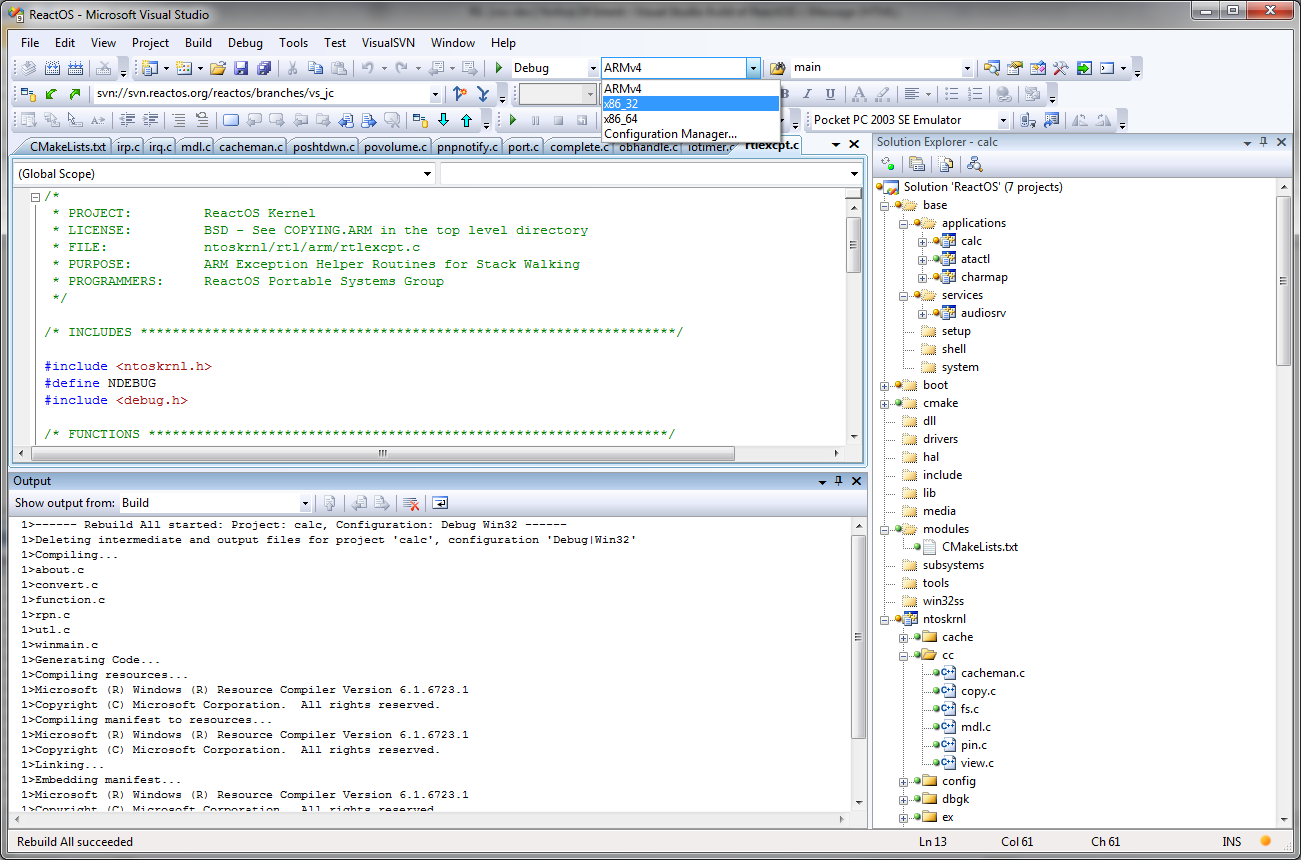

Am 12.01.2013 09:11, schrieb J. C. Jones:
The fact that it is not possible to build, say, just *applications*, or just *drivers*, without hunting-and-pecking projects in the *Solution Workspace*, is related to problem
No, it's just a missing cmake command to generate a solution file for applications. Of course you cannot build applications without building it's dependencies. And since we build all our dependencies (CRT, importlibs, certain headers) ourselves, all of these will be put into a solution for applications.
Having different architectures in the build will most likely never work, since it requires completely different cmake passes. Especially for ARM you need to do a cross build, where you first need to compile the host tools for x86 and then the rest for ARM (I think I made a configure script for that). I also don't see any merit in it. Noone usually switches between architectures on the fly. It's only there, because it's the best way to maintain it in VS project files, if that is how you organize your build. But we don't do that, we use cmake files.
/"Wow...*800-project* solution. Let's see, *x86_32*, *x86_64, ARM* support..nice...both *Debug* and *Release* present...good good...looks like *Solution Workspace* mirrors what is on disk..cool*...#include* paths in IDE project settings are relative to root of solution so I can move solution to another disk if I like...appreciate that...*IntelliSense* seems to be working correctly...and this *livecd* thing...I guess right-clicking on that and doing *Build* does minimum operations necessary to generate a live CD. I wonder what happens when I try to execute the *livecd* project after built. Wow...that is too awesome!!! Ok. Everything makes sense. I can handle myself from here. Thanks."/
No offence, but a developer that judges a project solely on the fact that it managed to slap 800 modules into a single VS solution, rather than by the code or dozens of other factors, should probably rethink his profession ;-) I have been workig on a number of different projects, all with different build systems. Some sucked bad (autoconf shit) other were ok. ReactOS has the best build system of all of these. And the key here is simplicity and performance. No manual defining of 100 configuration commands plus 20 minutes over and over repeating test and configuration steps. It's simple. It builds fast. And it supports MSVC (WDK and VS from 2010 to 2012) and GCC and works on Windows/Linux/Mac. VS solution support is just sugar on top of that. And this is a complete f*cking Operating System and not a shitty browser.
IMO, we should give Amine time to get the ReactOS repository into this state..
Amine already did an awesome job. And delivered. If you need anything more: "We accept patches!"(tm) Or ... you could get a bunch of skilled devs that all strongly want these features and that might motivate someone to work on this. There's a lot of things that might be interesting for someone. An ARM port might be interesting, an x64 port might be interesting, a native DirectX might be interesting, support for WDDM drivers might be interesting, .... a working Memory Manager that doesn't crash all the time might be interesting. And now guess which of these would be considered a priority, and which of these not. I guess you'd need to convince someone of the demand / importance or take things in your own hands.
WBR, Timo
-
 J. C. Jones
 -
 Timo Kreuzer